First Avatar

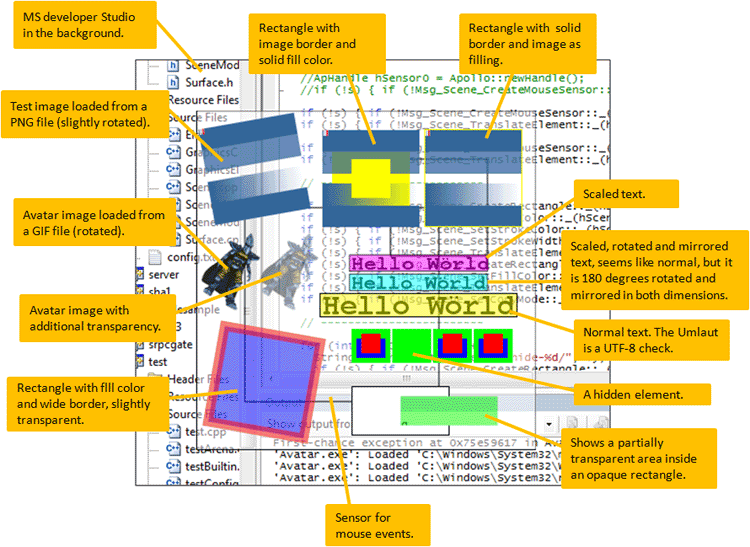
I started programming the avatar display. The image shows my test avatar on a test scene.

The test scene uses the scene graph module.

The avatar is already animated. An animation module decodes the old animation format and the animated GIF files and feeds images to the avatar display.

There is no web browser in the background, yet (the background is my Visual Studio). The avatar does not enter a real chat room. This is still a test. The overlay is created by a test function. The test function creates the avatar, assigns an animation, etc. The reason is, that I can develop the display quicker, more reliable, and without network connection. I do not have to open a browser and enter a chat room. The test just pretends that there is a browser and an avatar.

Later, when the avatar display works, then it will be connected to a browser and operated by a real chat room.

Scene Graph

I have been working on a 2D Scene Graph module. The scene graph will be used to show all graphics of avatar and virtual items on top of the web page.

The image to the right shows a test screen with all graphical elements.

What is the scene graph good for? There are 2 different ways to paint graphics and text: one is the old style of painting when the operating system asks the progam to re-paint a part of the screen. In the more modern style, the program defines how the graphics looks like and the scene graph paints it automatically.

We know this modern painting model from HTML, where we define what a web page contains and then the web browser paints it. If we change the HTML DOM, then the browser adapts the display to the new DOM automatically. The same model is used in 3D, where programs define a scene with lots of triangles and then let the graphics card display it.

Our scene graph has an additional feature. It can be scripted by other modules.

As you know, in the Open Virtual World client, everything is s module DLL. Third party developers can add modules easily without changing the core program. Developers can modify how the program works and what it does. Messages from and to the OVW scene graph can be intercepted by other modules. The modules can change messages, add messages and delete parts. They can manipulate the graphics of the avatar display They can add and change elements. They can paint new objects and change the style of text before it is painted on the screen.

OVW graphics is open to scripting by third party modules. This enables add-ons like WoW add-ons, which add all sorts of functionality. At the beginning, this is not a big thing for end users. But when module developers use the feature, then users can choose from a great variety of additional functions.

The scene graph has a minimal set of functions. But it has enough to display avatars on web pages. Previously, I implemented the avatar animation module. Now, everything is ready for the final piece:

I am about to start programming the avatar display.

Transparent GIF Animation Decoding

This was a long time. I had very much to do in my job and 3 weeks vacation. I also was kind of stuck with a problem while decoding animated GIFs with alpha transparency. The decoder did not want to return proper alpha values. So, I stepped deep inside the GIF decoder and prepared myself to add the missing function. But tonight I discovered the method"CxImage::AlphaFromTransparency", which did the job. Yes, the project takes much longer, than expected because of day time work. But it is still alive.

Animating Avatars

We are still building the avatar display. The most important part of the avatar display are the avatars. There are also chat balloons, nicknames, menus and more GUI stuff, but avatars are the most important part. And we want ths avatars to be animated.

What do we need for animated avatars?
  1. a renderer which puts pixels on the screen
  2. an animated avatar in whatever format
  3. a decoder, that decodes the avatar data
In the previous posting I discussed cairo as the renderer of choice. That's point 1. We now have to decide on point 2, the animation format and choose (or make) a decoder for that format. Of course, the decoder is strongly related to the animation format.

What is an animation format? An avatar can perform multiple actions. It can stand, walk, wave, etc. Therefore, we need not just one, but a set of animations for a single avatar. An animator component will then decode one animation sequence of the set and display frame after frame. If the avatar is supposed to wave, then the decoder will play the "wave" animation. Usually it will just play the "stand" animation. And when the avatar moves, then it should play a "walk" animation. So, the avatar format must provide multiple animations.

Lets review our options for an animation format
This list is very incomplete. Proposals are welcome.

Real 3D models would be cool, but I am not really a 3D expert. So, we will start by investigating the "config.xml" option.

This means: we need an XML parser (already in the Apollo framework) and a GIF decoder, which is capable of animations. Typical graphics libraries are candidates for the job. We are currently checking which library is capable of loading animated GIFs from memory and from file and be integrated into the project. Getting to know a code library takes some time. So, this will take a while. We are checking:
  1. OpenCV (no GIF?)
  2. CImg (no GIF?)
  3. GraphicsMagick (very complex, GIF loader not found)
  4. DevIL (GIF only from file, but we need decoding also from memory)
  5. GIL (GIL from Adobe does not support GIF)
  6. CxImage (GIF works)
  7. Imlib2 (could not find a Windows MSVC build)
  8. ...others?
The high profile image libraries seem to ignore GIF. This sounds weird, but is logical. GIF has only indexed color with max. 256 colors. It is not suited for real image processing applications.

Only CxImage survived the test. This is not an optimal solution, because CxImage is Windows based. It must be replaced for a Mac/Linux port. Replacing CxImage should not be too difficult, because there are only few lines of code in the application code. Basically loading an image file and iterating through the frames.

We do not want to spend too much time on this. So, we will now continue with the latest CxImage version.

Cairo Test

I am testing the cairo drawing library. I modified the transparency test program from my last blog post so, that it paints an avatar image with nickname instead of the pattern from the last blog.

I can move the avatar around and positioned it on top of a browser window. The result looks like there is an avatar standing on the browser - looks like everything is ready. But it's just a fake avatar. It is static, not animated, not from a chat room. It is just an image painted on a transparent window with the cairo drawing library. But as a cairo test, it is quite successful.

Painting graphics with cairo feels really backwards for us web programmers. We are used to markup: HTML, SVG, and XAML. Programming with "hard coded" functions like cairo_move_to, cairo_set_line_width and cairo_fill feels odd. No CSS, no div, no img-tag. Just good old C++ code with function calls.

I discovered another argument for cairo compared to WebKit. In a blog post (which I do not find anymore) a Google Chrome developer discusses the choice of skia. Skia is not hardware accelerated, which makes skia look like a bad choice. But, the Chrome developer argues, that most of the time the browser spends in HTML code, arranging DOM elements and applying hierarchies of CSS styles. Once the rendering code knows where to paint something, then only a small fraction of the time is spent for the actual drawing. This is a hint, that using WebKit is much worse performance-wise than using plain cairo. When we use cairo directly, then we get rid of all the time that WebKit spends dealing with HTML features. The trade off is, that there is no CSS, no JavaScript, and no iframe in the avatar display. CSS makes applying different styles easy. Styles and themes need much more effort in plain cairo drawing code. But it is should be much faster. And speed counts, because we do not want to slow down your PC.

OK, so, cairo works. The image above is only a fake. It is still a long way to go, but we are on the way.

Starting Avatar Display Development

The client has currently much backend code. It has all the protocol handling, user data, and chat functions we need. But there are no avatars yet. The "green" region is (almost) ready. The "red" region is still missing.

(Another part that is missing is a chat window. But when avatars are done, then the chat is a simple, trust me.)

(The IRC module will not be necessary for chat with avatars on web pages. Supporting the IRC chat protocol in addition to XMPP/Jabber is an option for later.)

So, now it is all about the "red" circle: animated avatars on a transparent layer over the web page.

The data is available, graphics is available, is just has to be painted. This sounds simple. But, it is not that simple. We are programming software that should be portable to different platforms, specifically to MacOS and Linux although the original development (and first release) is on Windows. Painting on different platforms is not as simple as it sounds, because it is not possible to use the painting functions of the operating system. These functions (called drawing API) are not available on other operating systems. And because drawing code is heavy and takes much time to write, it is not good to adapt it for each operating system.

What we need is a cross platform drawing API. Many of us use Firefox or Chrome on Windows, Linux, and Mac. These programs have the same problem. And they solved it by using cross platform drawing APIs. Firefox pains everything you see on the screen using a library called cairo. Chrome uses skia. These libraries are ways to abstract drawing, so that the display can be ported to other platforms with reasonable effort.

There are other ways to paint stuff in a platform independent way. One possibility is to use a HTML-renderer, such as WebKit. We could integrate WebKit and paint avatars and chat balloons with HTML and JavaScript. Actually, this is a good solution, because we intend to integrate WebKit anyway for program windows and dialogs. The only drawback is, that it is not much fun to write lots of drawing code in JavaScript. Also, performance might be a problem, because the drawing code would be interpreted by the JavaScript runtime and every visible element would be in HTML with CSS. This is how web browsers work and it is OK for them. But when you surf the Web and your animated avatar is painted all the time, then you don't want your avatar to take much CPU. A web browser can take much CPU while it paints a page, but after that it is silent. Avatars, however are animated and paint again and again. Very much like a Flash banner on newspaper page, that always draws CPU and slows your PC. We do not want to slow your PC.

On the other hand painting is much easier with WebKit than with graphics libraries like skia and cairo. Speed speaks for skia and cairo. The JavaScript programming issue speaks against WebKit. No easy decision. Do you have any ideas?

I the meantime, I made a simple program that just paints patterns transparently on the background. It is a demo to check how that works on Windows. All we have to do is to use skia, cairo, or WebKit or someting else to paint avatars on such a transparent layer. We will decide soon which library we will use.

If you have comments, let us know.

Hammer vs. Coffee Machine

I implemented a simple "competition" feature. Competition means, that some items can damage other items. This is another check of the item server design.

Competition is a bit more advanced and demanding, than the crafting. During implementation I learned, that we need floating point values in addition to integer values. I could map all crafting actions onto integers. But competition needs finer grained computations. So I had to change the database. I also added time values to implement a cool down period and had to change the database structure again. Effectively, the cool down implements a hit-rate limitation, which leads - in combination with damage values and modifications - to the usual DPS (damage per second) statistics.

Before I started coding, I modeled the behavior in Excel:


Here is what we can see at on the inventory web pages. This is the inventory with a hammer and a coffee machine. I used the coffee machine to make coffee, but the hammer can also damaged it:


This is the coffee machine. It is in perfect shape (Condition: 100%, Hitpoints: 1000). Obviously, the coffee machine is susceptible to shock damage and piercing damage. But shock damage is more dangerous. Piercing damage can be absorbed more easily.


The hammer. It can be used once per second (Attack cooldown). The hammer is a shock device. It smashes into something. It does no piercing damage. A knife would be different. The hammer makes 100 points shock damage. But the victim will absorb some of the damage.


Now I can hit the coffee machine one with my hammer with this command:
http://localhost:3277/Portal/Inventory/DroidAction/61/Hit/47
After the "hit", the coffee machine is in worse condition than before. It lost a bit of its "Condition" value (Condition: 93.0 %):


The hammer lost also a bit of its condition. Much less than the coffee machine. It is just a bit worn down (Condition: 99.9 %). The hammer will have to be repaired after some time in order to project the full damage.


Very simple, isn't it? But there are powerful mechanisms implemented which we will use later. The design of the item server has been verified and completed with workflows of different areas. The item server:
  • caches items,
  • loads items from a database
  • returns item properties on request
  • has user actions
  • has interactions between items, and
  • saves changes to the database

I will now leave the item server and return to work on the client. The client has lots of back-end and protocol code. But it does not really show avatars. We want to see animated avatars chatting on web pages. The client also needs a user interface. It needs windows, dialogs, a settings dialog, a buddy list, etc. But most important are avatars. That's the next step. Not a small one. I'll keep you updated.